
Fourth Watch Labs / Canopy
Canopy
New instruments for immersive post-production sound. Place a sound in the room, shape how it spreads into the speakers around it, and move it, with every channel carrying its own variation of the audio. Every placement, spread and movement is the mixer's decision.
In development. Not on sale.
- Apps
- Canopy Studio, Affinity Engine and Canopy Live, all on one Mac
- Platform
- macOS 13 Ventura or later. Apple silicon recommended.
- Layouts
- Stereo, LCR, Quad, 5.0, 5.1, 7.0, 7.1 and 9.1, plus the Atmos bed layouts 5.1.2, 5.1.4, 7.1.2, 7.1.4 and 9.1.6
- Plug-in
- Canopy Live: an instrument plug-in for Pro Tools (AAX), also AU and VST3. Read more
Beyond traditional panning
The old compromise
Traditional panning was designed to place a sound between a pair of speakers. Ask it to fill a 7.1.4 room and it can only play the same sound through more speakers at different levels. Every channel carries an identical signal, so the sound turns phasey, collapses toward the middle of the room, and falls apart as soon as you move off the sweet spot.
Canopy works differently. Place a sound in the room and shape how it spreads into the channels around it. Each channel gets its own independent, decorrelated variation of the audio rather than the same signal again, so the field stays wide and stable.
Affinity and density
Every speaker gets an affinity score from how close the source sits to it on the panner. High-scoring speakers play the sound; low-scoring ones drop out. DENSITY adds extra independent draws of the same recording on more of the speakers around it. BIAS, FOCUS and HEIGHT set how strongly the nearest speakers are favoured, how tight the footprint is, and how much the ceiling speakers join in.
How it fits together
Three apps on one Mac
Canopy Studio
Build
Find sounds, build and save scenes, place them on the panner, preview and export.
Affinity Engine
Bake and serve
Runs in the background. Bakes scenes, serves every Canopy Live instance, holds the Scene Library and handles Pro Tools capture and spotting.
Canopy Live
Play in your DAW
An instrument plug-in in your DAW. Plays scenes in sync with picture.
Scene Library
Shared by all three. One Mac. Nothing goes over the internet.
All three run on the same Mac and talk to each other directly. Nothing is sent over the internet.
Canopy Studio
Where scenes are made
A scene is one arrangement of sources in the room: one location or one moment, such as a forest at night or a harbour at dawn. A project holds as many scenes as you need.
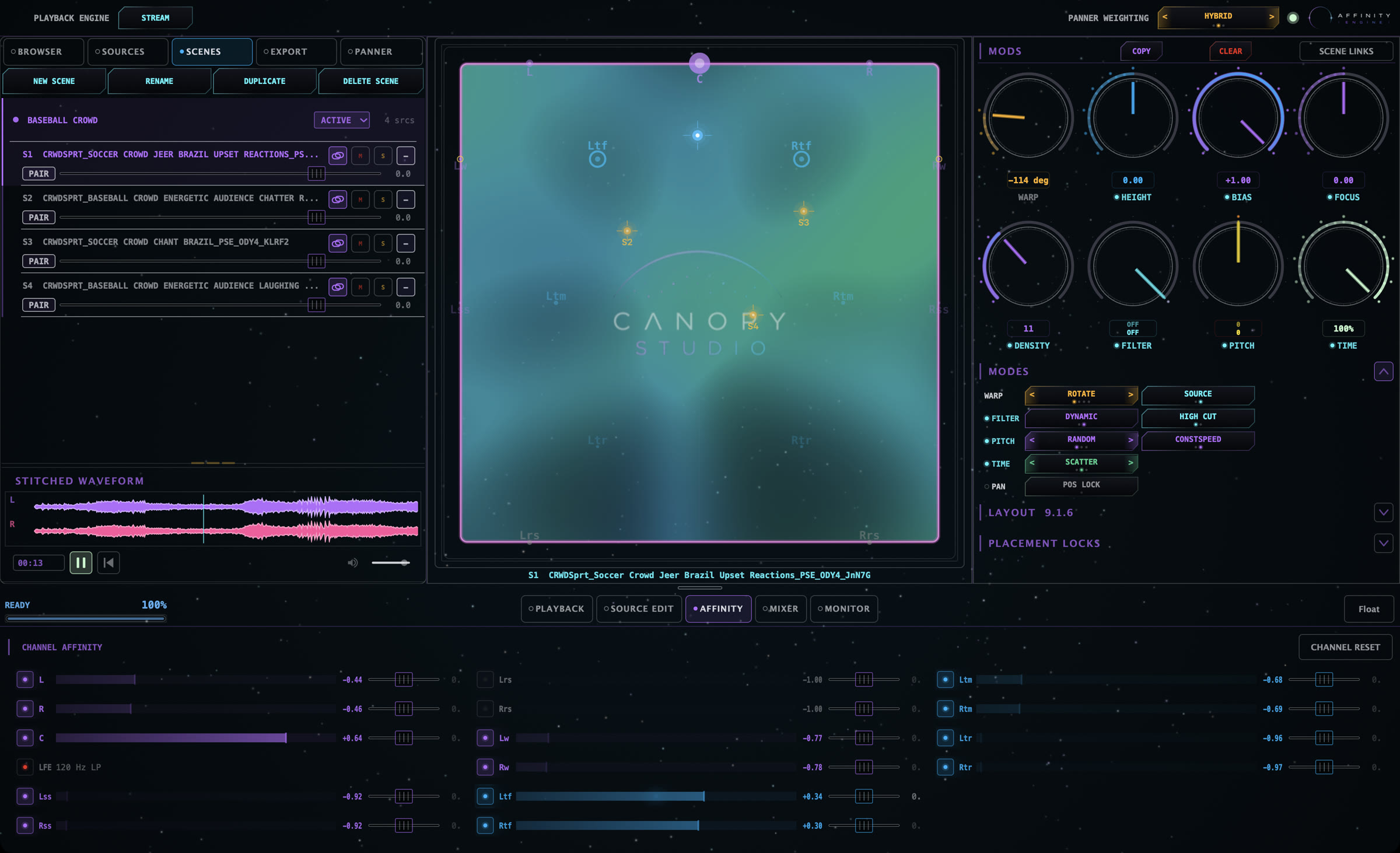
- Browser. Index your own sound library and search it by name, UCS category and tags.
- Source Edit. Remove rumble, clicks and DC offset, cut out bad moments, and set clean loop points.
- The panner. A top-down view of the room that knows every speaker in your layout, including the heights. Sources can also travel beyond the walls.
- The control deck. WARP, HEIGHT, BIAS, FOCUS, DENSITY, FILTER, PITCH and TIME, per source or linked across the scene.
- Correlation map. A heatmap over the panner that measures how alike the audio channels are. Lower correlation reads wider.
Move the whole room
WARP moves every source in the scene at once: rotate, shift, push or explode the arrangement. The rest of the deck shapes each source, or every linked source together.
Two engines, one switch
The ENGINE switch at the top of the Studio window chooses how you listen. The STREAM engine bakes each source once into packs, then mixes them live, so every move on the panner and deck is heard instantly. The RENDER engine bakes the full mix, exactly what Export writes.
Scene Library
Save scenes to the Scene Library and reuse them across projects. Each one keeps a 10-second preview. Canopy Live loads its scenes from the same library.
Export
- Multichannel WAV in the scene's own layout.
- An optional fold-down to 7.1, 5.1, stereo or mono, written alongside the full file.
- UCS file names for sound effects library releases.
- A sample rate set per project, up to 192 kHz.
- SPOT TO PT places the render straight into the open Pro Tools session.
Affinity Engine
Bakes and serves, in the background
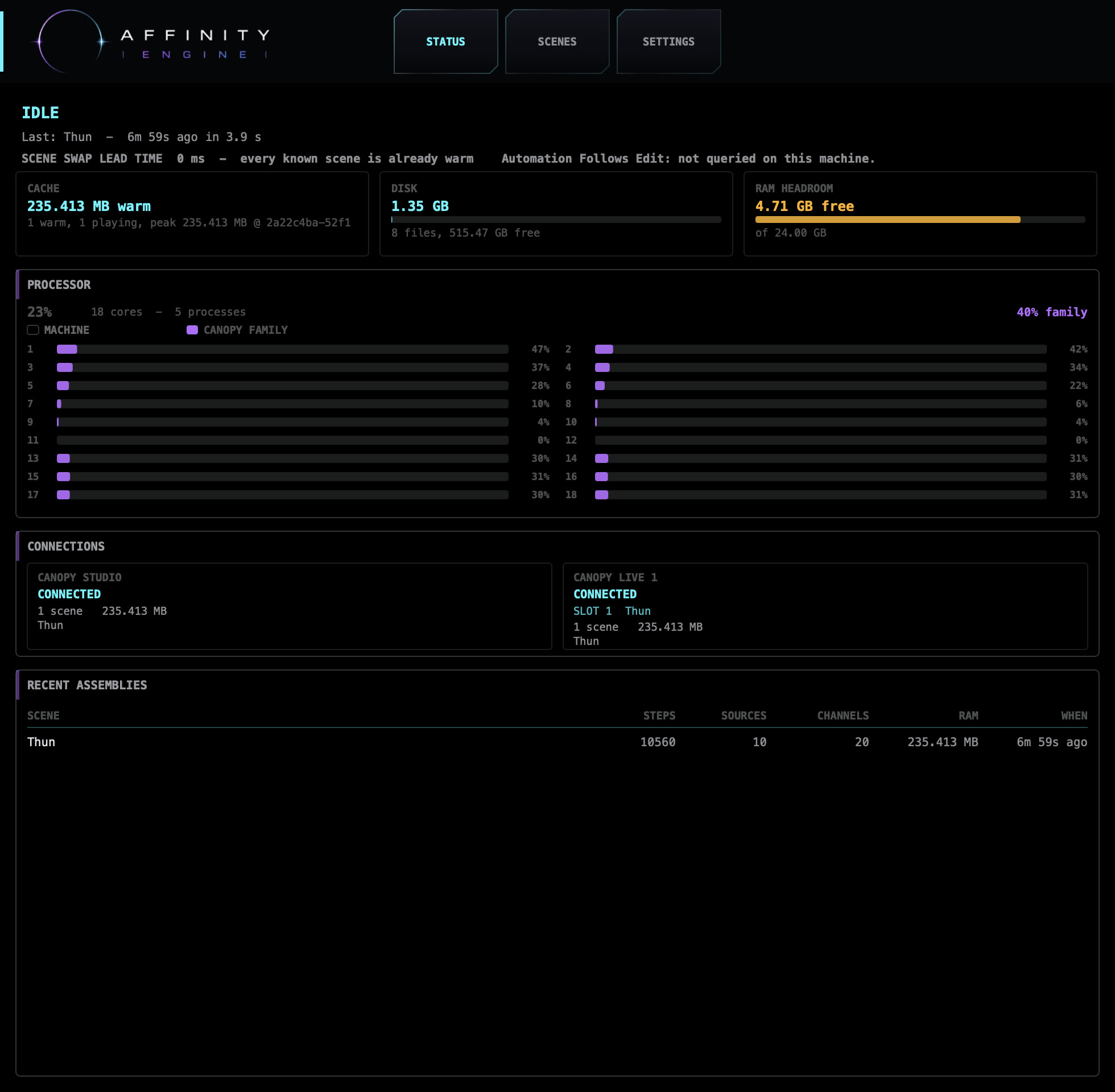
Affinity Engine is a background app. It bakes scenes into ready-to-play packs, serves them to every Canopy Live instance, holds the Scene Library, and handles Pro Tools capture and spotting. Most of the time you never open its window.
It works only with apps on the same Mac and does not open a network port.
Canopy Live
Your ambience edit, as scenes
Canopy Live is an instrument plug-in that plays Canopy scenes inside your DAW, in sync with picture: AAX for Pro Tools, plus AU and VST3, on layouts from stereo to 9.1.6. With Edit Capture it reads a whole Pro Tools ambience edit into scenes, one per clip or per gap, and follows your timeline.
In the session you shape each scene against picture, switch scene slots on cuts with automation, and lock sources in position.
Pro Tools and other DAWs
Working with your DAW
- SPOT TO PT, guide tracks
- Pro Tools 2024.10 or later
- Capture, Edit Capture
- Pro Tools 2025.6 or later
- Other DAWs
- Studio exports WAV files for any DAW. Canopy Live runs in hosts that support AU, VST3 or AAX instruments.
Requirements
What you need
- Computer
- A Mac running macOS 13 Ventura or later. Apple silicon recommended.
- Memory
- 16 GB or more is comfortable.
- Audio
- An interface with an output for every speaker in your layout, or headphones and stereo speakers.
- Not supported
- Windows, web and iOS
Craft and control
No AI. Your recordings, your decisions.
Canopy uses no generative AI, no LLMs and no machine learning. It does not create sounds and it does not make mixing decisions. Every sound comes from your own recordings, shaped by controls you set and can hear.
Canopy is not a DAW and not a sound library store. You bring the sounds and the ideas; Canopy gives you new instruments to shape them in space.
Status
In development
Canopy is in development and not on sale. There is no public download or price yet. To talk to us about it, write to [email protected].